


1. The Ergonomic Mandate: Screen Elevation and Posture Relief
Prolonged laptop use on flat tables is one of the leading causes of modern workplace musculoskeletal disorders, commonly referred to as "tech neck." When your head tilts downward at a 45-degree angle to look at a low screen, the effective gravitational load placed on your cervical spine increases from approximately 5 kilograms to an astonishing 22 kilograms. Over months and years, this results in chronic upper back stiffness, tension headaches, and repetitive strain injuries.
An adjustable ergonomic laptop stand elevates the top third of your laptop display directly to your natural eye line, allowing your head and neck to remain upright in a neutral, fatigue-free posture. Your shoulders relax naturally, breathing improves, and focus remains sharp throughout 8-to-10-hour workdays.
2. Passive Aluminum Heat Dissipation vs Active USB Cooling Fans
Laptop processors generate considerable heat during multitasking, video rendering, and gaming. When placed flat on wooden desks or fabric tablecloths, bottom intake vents are choked, leading to thermal throttling where the CPU slows down by up to 30% to prevent overheating:
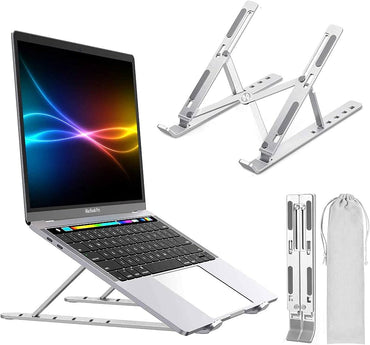
- Passive Open-Air Aluminum Stands: Made from high-conductivity aluminum alloy with hollow open-back designs. Elevating the laptop allows 360-degree ambient airflow beneath the intake vents. The aluminum body acts as a secondary heat sink, reducing operating temperatures by 5°C to 10°C in complete silence with zero power consumption.
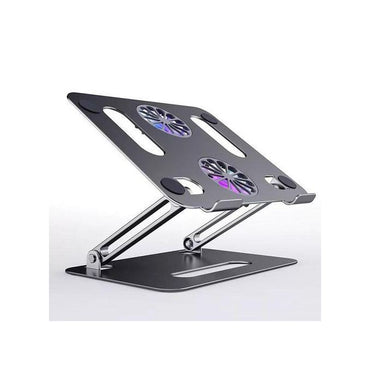
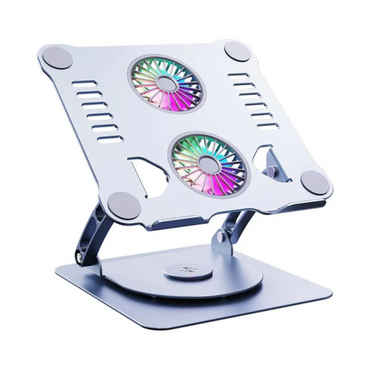
- Active Cooling Stands (e.g., Foldable P43F): Features integrated dual high-speed, whisper-quiet cooling fans powered directly via a standard USB cable from your laptop. By forcing cool air directly into the bottom intake grilles, active cooling stands reduce internal CPU and GPU temperatures by up to 15°C — essential for demanding gaming laptops and video editing workstations in warm environments.
3. CNC-Machined Aluminum Alloy, Silicone Grips & Anti-Wobble Rigidity
Flimsy plastic stands wobble under heavy keystrokes and can collapse under the weight of larger business laptops. Our laptop stands are constructed from premium aviation-grade sandblasted aluminum alloy:
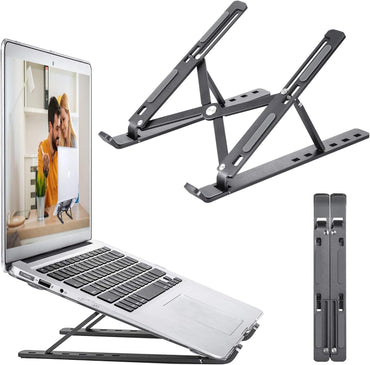
- Precision Geared Multi-Angle Hinges: Sturdy mechanical friction hinges or slotted adjustment arms offer 6 to 9 discrete tilt angles, holding your laptop securely at angles ranging from 15 degrees up to 60 degrees without slippage.
- Full-Coverage Anti-Scratch Silicone Pads: Generous non-slip silicone rubber cushions line the supporting base, cradle arms, and front protective lip. This prevents metal-on-metal scratching on delicate aluminum MacBook surfaces and prevents the laptop from shifting when typing.
4. Collapsible Portability: Flat-Folding Mechanisms for Laptop Bags
For hybrid workers who alternate between office desks in Westlands and home offices, portability is essential. Our foldable laptop stands collapse completely flat in seconds into an ultra-slim profile resembling a thin folding ruler or book.
Weighing as little as 250 to 450 grams, they slip effortlessly into the side pocket or document sleeve of your standard laptop bag or backpack without adding noticeable bulk, allowing you to establish an ergonomic workspace in client offices, hotel rooms, or coffee shops.
5. Laptop Stand Specifications & Pricing and Value in Kenya
| Stand Model | Material & Adjustment | Cooling Type | Supported Laptop Sizes | Typical Price Range (KES) |
|---|---|---|---|---|
| Foldable Portable Riser | Reinforced Polymer / 6-Angle Tilt | Passive Open-Air Ventilation | 10" – 15.6" Laptops / Tablets | KES 1,000 – KES 1,500 |
| Aluminum Alloy Folding Stand | CNC Sandblasted Aluminum / 7-Angle | Passive Thermal Aluminum | 11" – 16.0" MacBooks & Laptops | KES 2,000 – KES 2,500 |
| P43F Active Cooling Stand | Aluminum Alloy / Multi-Angle | Dual USB Silent Cooling Fans | 11" – 17.3" Heavy Gaming/Pro Laptops | KES 3,800 – KES 4,500 |
6. Creating an Ergonomic Workstation: Keyboards, Mice, and Hubs
When you elevate your laptop screen on a stand, typing directly on the elevated laptop keyboard at a steep angle is ergonomically impractical for long periods. The gold-standard ergonomic desk setup requires separating screen height from input controls:
- External Wireless Keyboard: Place a dedicated keyboard flat on your desk so your elbows rest at a comfortable 90-degree angle. Explore our computer keyboards and Logitech keyboards collections.
- Precision Wireless Mouse: Pair with an ergonomic mouse from our Logitech mouse and computer accessories departments to prevent wrist strain.
- Multiport USB-C Hub: Connect your display, keyboard, mouse, and charger through a single cable using our multiport hubs.
7. Setup Instructions: Height Calibration and Cleaning Best Practices
Setting up your laptop stand for optimal posture takes less than two minutes:
- Eye-Level Alignment: Adjust the support arms until the top edge of your laptop screen is level with your natural horizontal eye line when sitting upright with feet flat on the floor.
- Maintain Open Vent Clearance: Ensure the bottom intake vents of your laptop align with the open cutouts of the stand to maximize cool airflow.
- Cleaning: Wipe aluminum surfaces occasionally with a dry microfiber cloth to remove dust and skin oils. Never submerge active fan models in water.
8. Why Buy Laptop Stands from Zentech Electronics Kenya?
Zentech Electronics Kenya provides sturdy, verified ergonomic accessories built for long-term daily reliability:
- Heavy-Gauge Tested Hardware: We stock genuine aluminum alloy stands engineered with robust friction hinges that never droop or sag under heavy laptops.
- Hands-On Testing at The Bazaar Plaza: Test your own laptop on our display stands to check balance and height at The Bazaar Plaza, along Moi Avenue, 10th Floor, Wing A, Suite 1038, Nairobi.
- Complete Workspace Packages: Pick up matching keyboards, mice, hubs, and laptop bags in one convenient shopping trip.
- Fast Nairobi & Kenya Delivery: Guaranteed 2-hour courier dispatch across Nairobi, with overnight shipping countrywide.
9. Frequently Asked Questions (FAQ)
How much does a laptop stand cost in Kenya?
In Kenya, basic foldable laptop stands start from KES 1,000 to KES 1,500, while premium CNC aluminum alloy stands range between KES 2,000 and KES 2,500. Heavy-duty aluminum stands with integrated USB cooling fans like the P43F cost between KES 3,800 and KES 4,500 at Zentech Electronics Kenya.
Can I type directly on a laptop while it is on a stand?
While low tilt angles (15 to 20 degrees) permit light typing, elevating a laptop to proper eye level creates a steep incline that strains the wrists. For the best ergonomic posture, we strongly recommend pairing your elevated laptop with an external wireless keyboard and mouse placed flat on your desk.
Will a laptop stand fit an Apple MacBook or large 17-inch gaming laptop?
Yes. Our adjustable aluminum stands are universally compatible with all laptops from 10 inches up to 17.3 inches, including Apple MacBook Air, MacBook Pro, HP, Dell Latitude, and Lenovo ThinkPad machines. Wide anti-slip front hooks keep heavy gaming laptops securely in place.
Do cooling stands with fans really lower laptop temperatures?
Yes. Elevating the laptop allows cooler airflow under the bottom intake vents, lowering temperatures by 5°C to 8°C passively. Models with active USB-powered cooling fans force cool air directly into internal heat sinks, lowering temperatures by up to 15°C to prevent thermal throttling during intensive tasks.
Where can I buy ergonomic laptop stands in Nairobi, Kenya?
You can test and purchase premium ergonomic laptop stands at Zentech Electronics Kenya, located at The Bazaar Plaza, along Moi Avenue, 10th Floor, Wing A, Suite 1038, Nairobi. We offer in-person inspections, warranty slips, and prompt deliveries nationwide.