


1. The Role of Network Switches: Wired Stability vs Wi-Fi Congestion
Modern homes and commercial enterprises are saturated with wireless signals from smartphones, smart speakers, laptops, and IoT sensors. While wireless mesh is convenient, the 2.4GHz and 5GHz radio spectrum suffers from wall attenuation, microwave interference, and latency spikes. When high-bandwidth tasks require absolute consistency, an unmanaged network switch is the most cost-effective upgrade you can introduce to your network topology.
A network switch acts as a high-speed data junction box, receiving data packets from one connected device and forwarding them exclusively to the intended destination port via hardware MAC address filtering. This prevents data packet collisions, reduces network chatter, and ensures full dedicated bandwidth for critical equipment like desktop PCs, network printers, NAS storage, and video conferencing terminals.
2. TP-Link 5-Port vs 8-Port Switches: TL-SF1005D and TL-SF1008D Compared
TP-Link desktop switches represent the industry standard for dependable, low-cost unmanaged wired distribution:
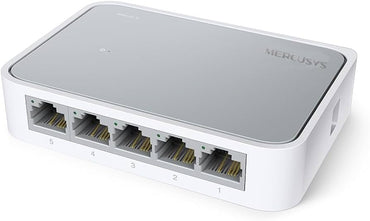
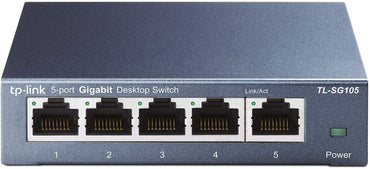
- TP-Link TL-SF1005D (5-Port Fast Ethernet Switch): Features five 10/100Mbps auto-negotiation RJ45 ports encased in a sleek, compact polymer housing. Consuming only 1.87 watts under maximum load, it is the perfect solution for small home desks where you need to split one wall Ethernet drop into dedicated lines for a desktop computer, a smart TV, and a networked printer.
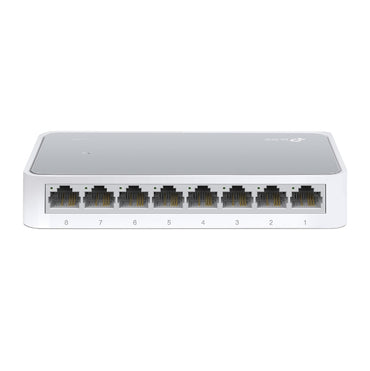
- TP-Link TL-SF1008D (8-Port Fast Ethernet Switch): Expands capacity to eight 10/100Mbps auto-negotiation RJ45 ports. It accommodates growing office teams, multi-camera NVR CCTV security installations, or retail POS stations, delivering reliable concurrent throughput across all eight endpoints without bottlenecks.
3. Auto-MDI/MDIX and Zero-Configuration Plug and Play Simplicity
In older legacy networks, connecting two networking hubs or switches required specialized "crossover" Ethernet cables, while connecting computers required "straight-through" cables. TP-Link switches completely eliminate this hassle through integrated Auto-MDI/MDIX (Medium Dependent Interface / Crossover):
- Automated Crossover Detection: Every individual RJ45 port automatically detects whether the connected cable is straight-through or crossover, dynamically configuring the internal transmit and receive pins. You can use any standard Cat5e, Cat6, or Cat7 patch cable interchangeably.
- Auto-Negotiation: Each port intelligently senses the maximum link speed (10Mbps or 100Mbps) and duplex mode (Half or Full Duplex) of the attached device, instantly optimizing connection parameters without requiring user intervention.
4. Green Ethernet Technology: Intelligent Power Optimization
TP-Link's latest generation switches feature eco-friendly Green Ethernet technology, enabling network expansion while drastically lowering your electricity footprint by up to 60-70%:
- Power Down Inactive Ports: When a connected computer, console, or printer is switched off, traditional switches continue to supply full power to that port. TP-Link switches detect link status and automatically power down idle ports.
- Cable Length Power Adjustment: Traditional switches broadcast signal strength sufficient for a 100-meter cable run regardless of actual length. Green Ethernet analyzes the electrical resistance of the cable run; if you connect a short 1-meter or 3-meter patch lead, the switch reduces transmission wattage accordingly.
5. Non-Blocking Architecture and IEEE 802.3x Flow Control
Performance in an Ethernet switch is governed by internal switching capacity and buffering capability. The TP-Link TL-SF1005D and TL-SF1008D utilize non-blocking switching architectures with wire-speed packet filtering and forwarding rates:
- IEEE 802.3x Flow Control (Full-Duplex): Prevents dropped packets during intense data transmission bursts by managing buffer memory thresholds between transmitting and receiving nodes.
- Backpressure Flow Control (Half-Duplex): Alleviates traffic congestion on legacy half-duplex connections, preventing packet loss and eliminating the need for repeated file re-transmissions.
- Silent Fanless Architecture: Because these switches utilize low-voltage passive cooling, there are no internal motorized fans. They operate in complete silence, making them ideal for bedroom home offices, recording studios, and noise-sensitive library environments.
6. Network Switch Specifications & Pricing and Value in Kenya
| Feature / Specification | TP-Link TL-SF1005D (5-Port) | TP-Link TL-SF1008D (8-Port) |
|---|---|---|
| Number of Ports | 5 x 10/100Mbps RJ45 Ports | 8 x 10/100Mbps RJ45 Ports |
| Supported Standards | IEEE 802.3, 802.3u, 802.3x | IEEE 802.3, 802.3u, 802.3x |
| Auto-MDI/MDIX | Yes (All Ports) | Yes (All Ports) |
| Switching Capacity | 1 Gbps Non-Blocking | 1.6 Gbps Non-Blocking |
| Packet Forwarding Rate | 0.744 Mpps | 1.19 Mpps |
| Power Consumption | Maximum 1.87W (Green Ethernet) | Maximum 2.05W (Green Ethernet) |
| Cooling System | Fanless Passive Cooling (Silent) | Fanless Passive Cooling (Silent) |
| Enclosure Type | Desktop Plastic Casing with Wall Mount Slots | Desktop Plastic Casing with Wall Mount Slots |
| Typical Kenya Price | KES 1,800 – KES 2,200 | KES 2,200 – KES 2,500 |
7. Building a Comprehensive LAN: Routers, Cables, and Security Cameras
A network switch serves as the backbone of your wired infrastructure, connecting seamlessly into your broader hardware environment. Uplink your switch to one of our primary wireless routers to distribute internet connectivity throughout your building. For dead-zone coverage where wiring is impractical, combine switches with high-speed Wi-Fi range extenders.
Ensure reliable, full-bandwidth transmission by pairing your switch with premium copper patch cords from our network cables collection. Hardwire surveillance systems from our security cameras catalog for stable 24/7 video feeds, or equip desktop towers with dedicated Wi-Fi dongles and computer accessories.
8. Installation, Wall Mounting, and Cable Management Best Practices
Deploying an unmanaged desktop switch requires zero software configuration. Follow these best practices for a neat, long-lasting installation:
- Designate Port 1 as Uplink: While all ports on unmanaged switches are symmetrical and support Auto-MDI/MDIX, connecting your incoming router cable to Port 1 makes port tracking intuitive during future network troubleshooting.
- Utilize Underside Wall-Mount Slots: Both the TL-SF1005D and TL-SF1008D feature dual keyhole slots on their base plate. Mounting the switch vertically on a wall or underside of a desk keeps desk space clear and prevents accidental disconnections.
- Label Cable Terminations: In multi-device setups, label both ends of your patch cables (e.g., "Office PC", "Printer", "CCTV NVR") using numbered cable tags or colored boot covers.
- Avoid Tight Cable Bends: Maintain an appropriate bend radius on all Ethernet cords leading into the RJ45 jacks to avoid internal copper fatigue or twisted pair cross-talk.
9. Why Buy Network Switches from Zentech Electronics Kenya?
Networking hardware forms the nervous system of your business and home entertainment. Zentech Electronics Kenya guarantees authenticity, reliability, and local warranty support:
- 100% Genuine Brand Sourcing: All TP-Link switches are sourced through certified regional distributors, ensuring genuine chipsets and full factory warranties.
- Instant In-Stock Availability: No waiting for import orders. We maintain abundant inventory for both single desktop units and bulk multi-unit commercial office fit-outs.
- Physical Nairobi Counter: Visit our retail branch at The Bazaar Plaza, along Moi Avenue, 10th Floor, Wing A, Suite 1038, Nairobi to purchase switches, patch cables, and networking tools in one convenient stop.
- Doorstep Delivery: Enjoy express 2-hour courier delivery across Nairobi, and reliable overnight parcel shipping to Mombasa, Kisumu, Nakuru, Eldoret, and countrywide.
10. Frequently Asked Questions (FAQ)
What is the difference between a router and a network switch?
A router connects your local home or office network to the external internet, assigns IP addresses via DHCP, and manages firewalls and Wi-Fi. A network switch connects multiple wired devices within your local area network (LAN), multiplying the number of Ethernet ports available from your router without creating a separate subnet.
How much does an unmanaged Ethernet switch cost in Kenya?
In Kenya, a genuine TP-Link 5-port 10/100Mbps desktop switch (TL-SF1005D) costs between KES 1,800 and KES 2,200, while an 8-port desktop switch (TL-SF1008D) costs between KES 2,200 and KES 2,500 at Zentech Electronics Kenya.
Do I need a special configuration or software to use a TP-Link switch?
No. Unmanaged switches like the TP-Link TL-SF1005D and TL-SF1008D are 100% plug-and-play. Simply connect the power adapter, run an Ethernet cable from your router into any port, and plug your devices into the remaining ports. The switch handles all traffic forwarding automatically.
Can I connect a network switch to another network switch (daisy-chaining)?
Yes. Thanks to Auto-MDI/MDIX technology, you can connect an Ethernet cable from any port on one switch into any port on another switch to expand port capacity. Ensure you do not connect multiple cables between the same two switches in an unmanaged network, as this creates a network loop that will freeze traffic.
Where can I buy genuine TP-Link network switches in Nairobi?
You can buy original TP-Link switches with warranty at Zentech Electronics Kenya, located at The Bazaar Plaza, along Moi Avenue, 10th Floor, Wing A, Suite 1038, Nairobi. We offer on-site consultations, compatible network cables, and fast delivery nationwide.