
RAM Sticks

RAM Sticks in Kenya — DDR4 and DDR3 Laptop and Desktop Memory Upgrade Modules (4GB, 8GB, 16GB 3200MHz)

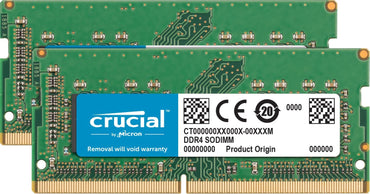
Accelerate your laptop responsiveness, eliminate application lag, and boost heavy multitasking headroom with genuine RAM sticks in Kenya at Zentech Electronics Kenya. Random Access Memory (RAM) serves as the high-speed volatile scratchpad for your operating system and active software. When available memory runs low, your computer is forced to swap memory blocks onto slower disk storage, resulting in sluggish application switching, browser freezing, and frustrating stutter during video editing or software compiling. Sourced from world-leading semiconductor memory pioneers like Crucial (Micron Technology), Kingston, and Samsung, our collection of DDR4 and DDR3 SODIMM laptop and UDIMM desktop RAM modules — spanning 4GB, 8GB, and 16GB 3200MHz/2666MHz — provides instantaneous plug-and-play speed enhancements.

At Zentech Electronics Kenya, all memory sticks are 100% factory-tested, gold-contact inspected, and backed by comprehensive store warranties. Whether you are upgrading an HP EliteBook, Dell Latitude, Lenovo ThinkPad, or custom desktop workstation, our experienced hardware technicians offer complimentary on-site installation and BIOS compatibility verification. Visit our central branch at The Bazaar Plaza, along Moi Avenue, 10th Floor, Wing A, Suite 1038, Nairobi to have your laptop memory upgraded while you wait, or order online for swift 2-hour doorstep delivery across Nairobi and secure countrywide courier shipping via Wells Fargo and Fargo Courier.

Read More: Comprehensive RAM Upgrade Guide, DDR Standards & Kenya Insights ▾

1. The Role of RAM: Why Upgrading Memory Delivers Instant Speed Gains

Every open Chrome browser tab, Microsoft Word document, background antivirus scan, and virtual conference call requires active space in physical RAM. When your computer runs out of physical memory, Windows initiates virtual memory paging, offloading active data to your storage drive. Even with a fast NVMe SSD, storage drives are orders of magnitude slower than system RAM.

Upgrading your memory from 4GB or 8GB to 16GB or 32GB provides the breathing room your processor needs. Applications open instantaneously, 30+ browser tabs remain active without reloading, photo editing in Adobe Photoshop operates smoothly without scratch disk warnings, and virtual machines run with native responsiveness.

2. DDR3 vs DDR4 Memory Standards: Frequencies and Voltages Explained

Computer memory standards have evolved across generations, each differing in clock speeds, physical notch placement, and operating voltages:

  • DDR3 / DDR3L (1.35V / 1.5V — 1600MHz): Found in legacy laptops and enterprise machines (such as 4th and 5th Gen Intel Core processors like the Dell Latitude E7240/E7450 and ThinkPad X240). Low-voltage DDR3L operates at 1.35V to conserve battery life.
  • DDR4 (1.2V — 2400MHz / 2666MHz / 3200MHz): The modern standard across 6th Gen through 12th Gen Intel Core and AMD Ryzen systems. Operating at a lower 1.2V while delivering substantially higher bandwidth up to 3200 MT/s, DDR4 boosts data transfer rates by up to 50% while generating less internal heat.

3. SODIMM Laptop Modules vs Desktop UDIMM Form Factors

Physical dimensions distinguish laptop memory from desktop memory:

  • SODIMM (Small Outline Dual In-Line Memory Module): Measures approximately 67.6mm in length with 260 pins (for DDR4). Designed specifically for compact laptop motherboards, All-in-One PCs, mini-PCs, and NAS enclosures.
  • UDIMM (Standard Unbuffered DIMM): Measures approximately 133.35mm in length with 288 pins (for DDR4). Engineered for standard desktop ATX and micro-ATX computer motherboards.

4. Choosing the Right Capacity: 4GB, 8GB, 16GB, or 32GB Dual-Channel

Determining your optimal RAM capacity depends on your specific daily computing workload:

  • 8GB RAM (Everyday Office & Study Baseline): Ideal for general web browsing, streaming video, Microsoft Office document drafting, and Zoom classes.
  • 16GB RAM (The Modern Sweet Spot): Highly recommended for software developers, accountants running massive Excel spreadsheets, content creators editing 1080p/4K video, and gamers seeking stutter-free framerates.
  • 32GB+ RAM (Power Users & Virtualization): Essential for architects rendering 3D CAD models, data scientists handling local datasets, and programmers running multiple Docker containers simultaneously.
  • Dual-Channel Advantage: Installing two identical 8GB sticks (2 x 8GB = 16GB) instead of a single 16GB stick activates 128-bit dual-channel memory interleaving, doubling theoretical memory bandwidth and boosting integrated graphics performance by up to 20%.

5. RAM Stick Specifications & Pricing and Value in Kenya

Memory Module Standard & Speed Form Factor & Voltage Recommended Use Typical Price Range (KES)
4GB DDR3L 1600MHz PC3L-12800S (1600 MT/s) 204-Pin SODIMM (1.35V) Upgrading older budget Core i5 laptops KES 1,500 – KES 2,200
4GB DDR4 2666MHz PC4-21300 (2666 MT/s) 260-Pin SODIMM (1.2V) Budget DDR4 dual-channel addition KES 2,000 – KES 2,500
8GB DDR4 3200MHz PC4-25600 (3200 MT/s) 260-Pin SODIMM (1.2V) Mainstream office & student laptops KES 3,200 – KES 3,800
16GB DDR4 3200MHz PC4-25600 (3200 MT/s) 260-Pin SODIMM (1.2V) High-performance developer / creative upgrade KES 4,800 – KES 5,500

6. Complementary Upgrades: Internal SSDs, Laptop Batteries, and Tools

A RAM upgrade is the most effective when combined with high-speed storage. If your laptop is still running a mechanical hard drive, pair your memory upgrade with an ultra-fast drive from our storage devices department.

Ensure long unplugged runtime by replacing worn power cells from our battery replacements collection, or explore dedicated laptop parts and maintenance for replacement fans and keyboards. If you decide it is time for a full hardware refresh, browse our enterprise laptops in Kenya and desktop computers catalogs.

7. Step-by-Step Installation: Anti-Static Safety and Dual-Channel Setup

Installing a RAM module is a straightforward physical upgrade:

  • Power Down & Disconnect Battery: Shut down the computer completely, unplug the AC adapter, and disconnect the internal battery connector before touching internal motherboard circuits.
  • Ground Yourself: Touch an unpainted metal surface to discharge any static electricity from your body that could damage sensitive silicon microchips.
  • Align the Key Notch: Insert the SODIMM module into the angled 30-degree slot, ensuring the physical notch aligns with the key in the socket. Press gently inward and push down until the metal retaining clips snap audibly into place.
  • Verify in BIOS & Task Manager: Power on the laptop and enter the BIOS or open Windows Task Manager to confirm the total memory capacity and running frequency.

8. Why Buy RAM Sticks from Zentech Electronics Kenya?

Buying computer components requires verified authenticity and guaranteed hardware compatibility. Zentech Electronics Kenya provides complete assurance:

  • 100% Genuine Branded Memory: We supply verified memory from Crucial, Kingston, Samsung, and SK Hynix with clean serials and gold contacts.
  • Free In-Store Installation: Bring your laptop to our workshop at The Bazaar Plaza, along Moi Avenue, 10th Floor, Wing A, Suite 1038, Nairobi. Our technicians will install and test your RAM free of charge.
  • Store Warranty & Exchange: Every RAM stick comes with full replacement warranty coverage against memory errors.
  • Fast Nairobi & Kenya Delivery: 2-hour doorstep delivery across Nairobi, and prompt overnight courier shipping countrywide.

9. Frequently Asked Questions (FAQ)

How much does a 16GB DDR4 laptop RAM stick cost in Kenya?

In Kenya, an authentic 16GB DDR4 3200MHz SODIMM laptop RAM module typically costs between KES 4,800 and KES 5,500, while an 8GB DDR4 module costs between KES 3,200 and KES 3,800 at Zentech Electronics Kenya.

How do I know if my laptop needs DDR3 or DDR4 RAM?

You can check your current memory standard in Windows by pressing Ctrl+Shift+Esc to open Task Manager, navigating to the Performance tab, and clicking Memory. It will display whether your system runs DDR3 or DDR4 and its running speed. Alternatively, our technicians at Zentech can inspect your laptop model and verify compatibility instantly.

Can I mix two different RAM brands or speeds in my laptop?

Yes, modern laptop motherboards support mixing brands as long as the memory standard (e.g., DDR4) and voltage (1.2V) match. If you install two sticks with different frequencies (e.g., 2666MHz and 3200MHz), the motherboard will automatically run both sticks at the speed of the slower module.

Does upgrading RAM make my laptop faster?

Yes. Increasing RAM eliminates system freezing and sluggishness caused by running out of memory. It allows your laptop to keep dozens of browser tabs open, run heavy office applications simultaneously, and switch between software without slowdowns.

Where can I get my laptop RAM upgraded in Nairobi, Kenya?

You can have your laptop RAM professionally upgraded at Zentech Electronics Kenya, located at The Bazaar Plaza, along Moi Avenue, 10th Floor, Wing A, Suite 1038, Nairobi. We offer complimentary installation, BIOS verification, and guaranteed warranties.
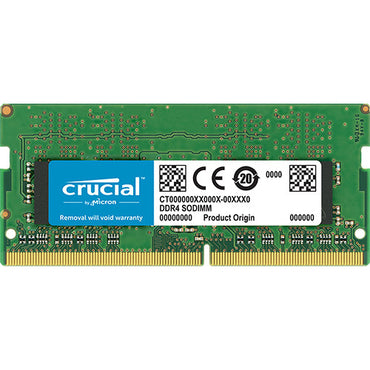
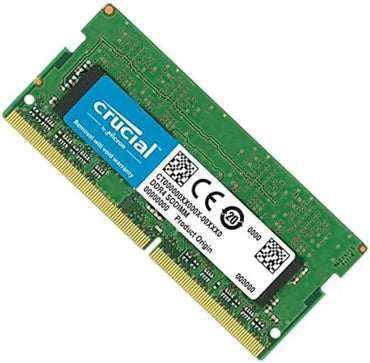
  • 4GB DDR4 RAM Stick PC4L 12800

    Regular price KSh5,000.00
    Sale price KSh5,000.00 Regular price KSh7,500.00
    Sale Sold out

        4GB DDR4 RAM Stick Price Kenya | PC4-25600 Upgrade Key Highlights of 4GB DDR4 RAM Stick PC4-25600 in Kenya 4GB DDR4-3200MHz (PC4-25600) for faster...

  • 16GB DDR4 3200MHz Laptop RAM — Fast Upgrade, Plug & Play Memory

    Regular price KSh5,000.00
    Sale price KSh5,000.00 Regular price KSh5,500.00
    Sale Sold out

      16GB DDR4 3200MHz Laptop RAM – High-Speed Notebook Memory Upgrade Upgrade your laptop’s performance instantly with the 16GB DDR4 3200MHz Laptop RAM, designed for speed,...

At a glance

Collection summary: Zentech Electronics Kenya sells RAM Sticks from The Bazaar Plaza, Moi Avenue, Nairobi. 2 products are listed. Pay with M-Pesa, cards, bank transfer, or cash on delivery within Nairobi. Pickup, same-day Nairobi delivery, and countrywide courier shipping.

Best for
Nairobi and Kenya shoppers comparing genuine RAM Sticks with store pickup, warranty included, and cash/M-Pesa checkout.
Key benefits
Authentic stock, in-store inspection before buying, M-Pesa checkout, same-day Nairobi delivery, and Kenya-wide shipping.
Unique features
Showroom at The Bazaar Plaza, 10th floor, Wing A, Suite 1038, Nairobi CBD. WhatsApp +254 739 238 917. In-store inspection before payment.
Use cases
Home, office, school, and business buyers who need genuine RAM Sticks in Kenya with reliable local support.

RAM Sticks in Kenya — DDR4 and DDR3 Laptop and Desktop Memory Upgrade Modules (4GB, 8GB, 16GB 3200MHz)

Accelerate your laptop responsiveness, eliminate application lag, and boost heavy multitasking headroom with genuine RAM sticks in Kenya at Zentech Electronics Kenya. Random Access Memory (RAM) serves as the high-speed volatile scratchpad for your operating system and active software. When available memory runs low, your computer is forced to swap memory blocks onto slower disk storage, resulting in sluggish application switching, browser freezing, and frustrating stutter during video editing or software compiling. Sourced from world-leading semiconductor memory pioneers like Crucial (Micron Technology), Kingston, and Samsung, our collection of DDR4 and DDR3 SODIMM laptop and UDIMM desktop RAM modules — spanning 4GB, 8GB, and 16GB 3200MHz/2666MHz — provides instantaneous plug-and-play speed enhancements.

At Zentech Electronics Kenya, all memory sticks are 100% factory-tested, gold-contact inspected, and backed by comprehensive store warranties. Whether you are upgrading an HP EliteBook, Dell Latitude, Lenovo ThinkPad, or custom desktop workstation, our experienced hardware technicians offer complimentary on-site installation and BIOS compatibility verification. Visit our central branch at The Bazaar Plaza, along Moi Avenue, 10th Floor, Wing A, Suite 1038, Nairobi to have your laptop memory upgraded while you wait, or order online for swift 2-hour doorstep delivery across Nairobi and secure countrywide courier shipping via Wells Fargo and Fargo Courier.

Read More: Comprehensive RAM Upgrade Guide, DDR Standards & Kenya Insights ▾

1. The Role of RAM: Why Upgrading Memory Delivers Instant Speed Gains

Every open Chrome browser tab, Microsoft Word document, background antivirus scan, and virtual conference call requires active space in physical RAM. When your computer runs out of physical memory, Windows initiates virtual memory paging, offloading active data to your storage drive. Even with a fast NVMe SSD, storage drives are orders of magnitude slower than system RAM.

Upgrading your memory from 4GB or 8GB to 16GB or 32GB provides the breathing room your processor needs. Applications open instantaneously, 30+ browser tabs remain active without reloading, photo editing in Adobe Photoshop operates smoothly without scratch disk warnings, and virtual machines run with native responsiveness.

2. DDR3 vs DDR4 Memory Standards: Frequencies and Voltages Explained

Computer memory standards have evolved across generations, each differing in clock speeds, physical notch placement, and operating voltages:

  • DDR3 / DDR3L (1.35V / 1.5V — 1600MHz): Found in legacy laptops and enterprise machines (such as 4th and 5th Gen Intel Core processors like the Dell Latitude E7240/E7450 and ThinkPad X240). Low-voltage DDR3L operates at 1.35V to conserve battery life.
  • DDR4 (1.2V — 2400MHz / 2666MHz / 3200MHz): The modern standard across 6th Gen through 12th Gen Intel Core and AMD Ryzen systems. Operating at a lower 1.2V while delivering substantially higher bandwidth up to 3200 MT/s, DDR4 boosts data transfer rates by up to 50% while generating less internal heat.

3. SODIMM Laptop Modules vs Desktop UDIMM Form Factors

Physical dimensions distinguish laptop memory from desktop memory:

  • SODIMM (Small Outline Dual In-Line Memory Module): Measures approximately 67.6mm in length with 260 pins (for DDR4). Designed specifically for compact laptop motherboards, All-in-One PCs, mini-PCs, and NAS enclosures.
  • UDIMM (Standard Unbuffered DIMM): Measures approximately 133.35mm in length with 288 pins (for DDR4). Engineered for standard desktop ATX and micro-ATX computer motherboards.

4. Choosing the Right Capacity: 4GB, 8GB, 16GB, or 32GB Dual-Channel

Determining your optimal RAM capacity depends on your specific daily computing workload:

  • 8GB RAM (Everyday Office & Study Baseline): Ideal for general web browsing, streaming video, Microsoft Office document drafting, and Zoom classes.
  • 16GB RAM (The Modern Sweet Spot): Highly recommended for software developers, accountants running massive Excel spreadsheets, content creators editing 1080p/4K video, and gamers seeking stutter-free framerates.
  • 32GB+ RAM (Power Users & Virtualization): Essential for architects rendering 3D CAD models, data scientists handling local datasets, and programmers running multiple Docker containers simultaneously.
  • Dual-Channel Advantage: Installing two identical 8GB sticks (2 x 8GB = 16GB) instead of a single 16GB stick activates 128-bit dual-channel memory interleaving, doubling theoretical memory bandwidth and boosting integrated graphics performance by up to 20%.

5. RAM Stick Specifications & Pricing and Value in Kenya

Memory Module Standard & Speed Form Factor & Voltage Recommended Use Typical Price Range (KES)
4GB DDR3L 1600MHz PC3L-12800S (1600 MT/s) 204-Pin SODIMM (1.35V) Upgrading older budget Core i5 laptops KES 1,500 – KES 2,200
4GB DDR4 2666MHz PC4-21300 (2666 MT/s) 260-Pin SODIMM (1.2V) Budget DDR4 dual-channel addition KES 2,000 – KES 2,500
8GB DDR4 3200MHz PC4-25600 (3200 MT/s) 260-Pin SODIMM (1.2V) Mainstream office & student laptops KES 3,200 – KES 3,800
16GB DDR4 3200MHz PC4-25600 (3200 MT/s) 260-Pin SODIMM (1.2V) High-performance developer / creative upgrade KES 4,800 – KES 5,500

6. Complementary Upgrades: Internal SSDs, Laptop Batteries, and Tools

A RAM upgrade is the most effective when combined with high-speed storage. If your laptop is still running a mechanical hard drive, pair your memory upgrade with an ultra-fast drive from our storage devices department.

Ensure long unplugged runtime by replacing worn power cells from our battery replacements collection, or explore dedicated laptop parts and maintenance for replacement fans and keyboards. If you decide it is time for a full hardware refresh, browse our enterprise laptops in Kenya and desktop computers catalogs.

7. Step-by-Step Installation: Anti-Static Safety and Dual-Channel Setup

Installing a RAM module is a straightforward physical upgrade:

  • Power Down & Disconnect Battery: Shut down the computer completely, unplug the AC adapter, and disconnect the internal battery connector before touching internal motherboard circuits.
  • Ground Yourself: Touch an unpainted metal surface to discharge any static electricity from your body that could damage sensitive silicon microchips.
  • Align the Key Notch: Insert the SODIMM module into the angled 30-degree slot, ensuring the physical notch aligns with the key in the socket. Press gently inward and push down until the metal retaining clips snap audibly into place.
  • Verify in BIOS & Task Manager: Power on the laptop and enter the BIOS or open Windows Task Manager to confirm the total memory capacity and running frequency.

8. Why Buy RAM Sticks from Zentech Electronics Kenya?

Buying computer components requires verified authenticity and guaranteed hardware compatibility. Zentech Electronics Kenya provides complete assurance:

  • 100% Genuine Branded Memory: We supply verified memory from Crucial, Kingston, Samsung, and SK Hynix with clean serials and gold contacts.
  • Free In-Store Installation: Bring your laptop to our workshop at The Bazaar Plaza, along Moi Avenue, 10th Floor, Wing A, Suite 1038, Nairobi. Our technicians will install and test your RAM free of charge.
  • Store Warranty & Exchange: Every RAM stick comes with full replacement warranty coverage against memory errors.
  • Fast Nairobi & Kenya Delivery: 2-hour doorstep delivery across Nairobi, and prompt overnight courier shipping countrywide.

9. Frequently Asked Questions (FAQ)

How much does a 16GB DDR4 laptop RAM stick cost in Kenya?

In Kenya, an authentic 16GB DDR4 3200MHz SODIMM laptop RAM module typically costs between KES 4,800 and KES 5,500, while an 8GB DDR4 module costs between KES 3,200 and KES 3,800 at Zentech Electronics Kenya.

How do I know if my laptop needs DDR3 or DDR4 RAM?

You can check your current memory standard in Windows by pressing Ctrl+Shift+Esc to open Task Manager, navigating to the Performance tab, and clicking Memory. It will display whether your system runs DDR3 or DDR4 and its running speed. Alternatively, our technicians at Zentech can inspect your laptop model and verify compatibility instantly.

Can I mix two different RAM brands or speeds in my laptop?

Yes, modern laptop motherboards support mixing brands as long as the memory standard (e.g., DDR4) and voltage (1.2V) match. If you install two sticks with different frequencies (e.g., 2666MHz and 3200MHz), the motherboard will automatically run both sticks at the speed of the slower module.

Does upgrading RAM make my laptop faster?

Yes. Increasing RAM eliminates system freezing and sluggishness caused by running out of memory. It allows your laptop to keep dozens of browser tabs open, run heavy office applications simultaneously, and switch between software without slowdowns.

Where can I get my laptop RAM upgraded in Nairobi, Kenya?

You can have your laptop RAM professionally upgraded at Zentech Electronics Kenya, located at The Bazaar Plaza, along Moi Avenue, 10th Floor, Wing A, Suite 1038, Nairobi. We offer complimentary installation, BIOS verification, and guaranteed warranties.

Buying from Zentech Electronics Kenya

Payment & Financing: We accept M-Pesa, debit/credit cards, bank transfers, and cash on delivery within Nairobi only. Lipa Pole Pole installment plans are strictly available on eligible smartphones and tablets.
Delivery & In-Store Inspection: We provide same-day delivery within Nairobi and nationwide courier delivery across Kenya. Customers can inspect products before purchasing at our store located at The Bazaar Plaza, Moi Avenue, 10th Floor, Wing A, Suite 1038 in Nairobi CBD.
Warranty Coverage: All brand-new electronics carry an official 1–2 year manufacturer warranty. Refurbished and Ex-UK equipment includes warranty with local store support.

Top Rated

Testimonials

Brian M., Nairobi

Customer, Nairobi

I ordered a Samsung Galaxy S23 Ultra, and I was amazed by how fast the delivery was! The phone arrived in perfect condition, well packaged, and exactly as described. Highly recommend!

Janet K., Mombasa

Customer, Mombasa

I was looking for a reliable power bank, and I found a great deal on a Baseus 20,000mAh power bank here. Will definitely shop again!

Kelvin O., Kisumu

Customer, Kisumu

I was skeptical about buying a smartwatch online, but I’m so glad I did! The Apple Watch Series 9 I bought is 100% original, works perfectly, and came in a sealed box. Best online electronics store in Kenya!

Samantha N., Nakuru

Customer, Nakuru

The team here is amazing! I bought a JBL PartyBox speaker, and they helped me choose the right model based on my needs. The delivery was fast, and they even followed up to ensure I was satisfied. That’s top-notch service!

Alex W., Eldoret

Customer, Eldoret

I got a Sony 55-inch 4K Smart TV from this website.The picture quality is amazing, and the sound is clear. The delivery was quick, and setting it up was easy. Definitely my go-to store for electronics!

Bestseller